
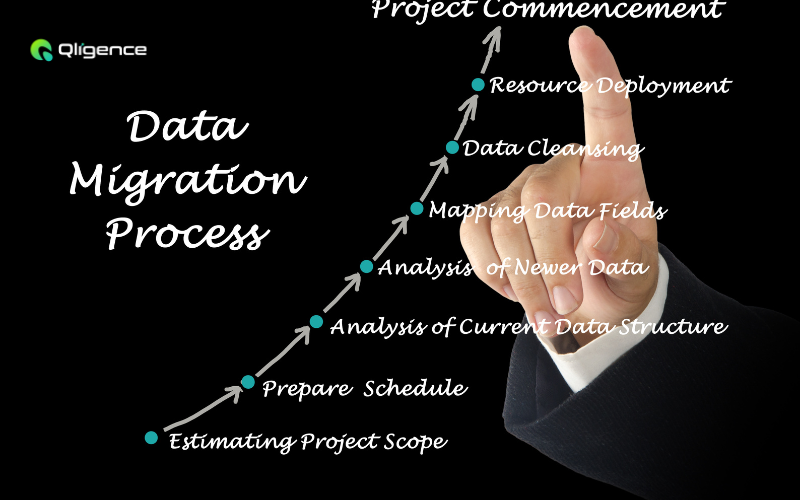
A Complete Data Migration Roadmap for Seamless Transitions
For businesses relying on digital operations, data migration is more than just a technical shift—it’s a strategic necessity. Whether moving to the cloud, upgrading systems, or consolidating databases, a poorly executed migration can lead to data loss, security vulnerabilities, and operational disruptions.
Take the example of Netflix, which once relied on on-premises data centers but faced challenges with scalability, downtime, and inefficiencies in delivering seamless streaming services. To overcome these hurdles, Netflix migrated its entire infrastructure to AWS (Amazon Web Services), ensuring high availability, enhanced performance, and the ability to scale resources dynamically. This migration played a crucial role in maintaining its reputation as a global leader in streaming services.
This blog outlines a step-by-step data migration roadmap, ensuring a smooth transition while safeguarding data integrity and minimizing downtime.
Understanding Data Migration: What It Really Means
Data migration is the process of transferring data between storage systems, databases, or cloud environments. Businesses undertake this process for various reasons, such as enhancing system performance, meeting compliance requirements, or integrating new technologies.
Types of Data Migration
-
Storage Migration – Moving data from outdated storage systems to modern solutions like cloud storage for better performance and cost efficiency.
-
Database Migration – Transitioning from one database system to another, such as shifting from on-premises databases to cloud-based solutions.
-
Application Migration – Relocating an application and its data to a new computing environment to improve functionality and scalability.
-
Cloud Migration – Moving applications, data, and workloads to cloud platforms like AWS, Azure, or Google Cloud for enhanced flexibility and remote accessibility.
Why Businesses Migrate Data
Companies embark on data migration journeys for various reasons:
-
System Modernization – Outdated legacy systems often become inefficient, slow, and expensive to maintain. Migrating to modern, cloud-based infrastructures helps businesses improve agility, reduce operational costs, and enhance performance.
-
Mergers and Acquisitions – When companies merge or acquire new businesses, integrating data from multiple sources is essential for seamless operations and unified decision-making. Migration ensures consistency across all platforms.
-
Regulatory Compliance and Security – Industries such as healthcare, finance, and government must comply with strict data security regulations like GDPR, HIPAA, and PCI DSS. Migrating to secure, compliant platforms ensures businesses meet these standards while protecting sensitive data.
-
Performance Optimization – Legacy systems may not support real-time analytics or large-scale processing, slowing down business insights. Migration to modern databases or cloud solutions enhances data processing speed and enables real-time decision-making.
-
Cost Efficiency – Maintaining on-premises data centers can be costly due to hardware, software, and staffing expenses. Cloud migration offers a scalable, cost-effective alternative by reducing infrastructure overhead and allowing businesses to pay only for the resources they use.
-
Disaster Recovery and Business Continuity – On-premises data storage is vulnerable to hardware failures, cyberattacks, and natural disasters. Migrating to a cloud-based system with automated backups and recovery plans ensures business continuity in case of unexpected failures.
-
Scalability and Global Expansion – As businesses grow, their data needs increase. Migrating to scalable cloud platforms allows companies to expand their digital presence across regions without worrying about storage limitations or infrastructure bottlenecks.
A Step-by-Step Data Migration Roadmap
Step 1: Pre-Migration Planning
A successful migration begins with meticulous preparation:
-
Conduct a Data Audit – Identify redundant, outdated, or incorrect data to avoid migrating unnecessary information.
-
Define Objectives – Set clear goals like performance enhancement, cost reduction, or regulatory compliance.
-
Build a Skilled Team – Assign roles to data engineers, compliance officers, and project managers to oversee the migration.
-
Assess Risks – Develop contingency plans for potential pitfalls such as data corruption or integration failures.
Step 2: Data Cleansing and Preparation
-
Remove Duplicates – Ensure data consistency by eliminating redundant records.
-
Correct Errors – Fix inaccuracies and standardize formats for smooth integration.
-
Secure Sensitive Data – Encrypt and classify data to prevent security breaches during migration.
Step 3: Choosing the Right Migration Strategy
Depending on business needs, choose an approach:
-
Big Bang Migration – A one-time transfer, best for small datasets.
-
Phased Migration – Gradual data movement to minimize operational disruptions.
-
Parallel Migration – Running both old and new systems simultaneously for a controlled transition.
Step 4: Execution and Testing
-
Extract, Transform, Load (ETL) – Use automation tools like Talend, Informatica, or AWS Data Migration Service.
-
Pilot Migration – Test a small dataset to identify potential issues before full-scale execution.
-
Validation and Testing – Conduct rigorous testing to ensure data integrity and system compatibility.
Step 5: Post-Migration Optimization
-
Monitor Performance – Use dashboards to track system efficiency and resolve bottlenecks.
-
Train Employees – Educate staff on the new system to maximize adoption.
-
Implement Continuous Improvements – Optimize configurations based on real-time performance analytics.
Case Study: How Airbnb Achieved Seamless Data Migration
Airbnb, the global accommodation marketplace, faced challenges with its traditional database structure, which struggled to handle the increasing number of users and transactions. To ensure a seamless user experience and improve platform performance, Airbnb migrated its data infrastructure from a monolithic database to a scalable, cloud-based system using Amazon RDS (Relational Database Service).
The Results:
-
99.99% uptime, ensuring smooth bookings and customer interactions.
-
Faster query performance, improving search and recommendation algorithms.
-
Enhanced scalability, allowing the company to handle peak booking seasons efficiently.
This successful migration allowed Airbnb to continue expanding its services worldwide while maintaining an optimal customer experience.
Conclusion
Data migration is a crucial business decision that demands careful planning and execution. Following this roadmap ensures a smooth transition, minimizing risks and maximizing benefits. Whether upgrading infrastructure or moving to the cloud, businesses that prioritize structured migration strategies stand to gain improved efficiency, security, and scalability.
Looking for expert guidance on seamless data migration? Contact our team to ensure a smooth transition for your business data.